
Setting up your property tax portal account
What you'll need
Roll number your 19-digit Roll Number
Access code shown on your tax bill
Owner name exactly as listed on notice

Troubleshooting Property Registration
If you receive an error stating that your credentials are incorrect, check that the information you entered matches your property tax bill exactly.
Enter the following information exactly as it appears on your bill: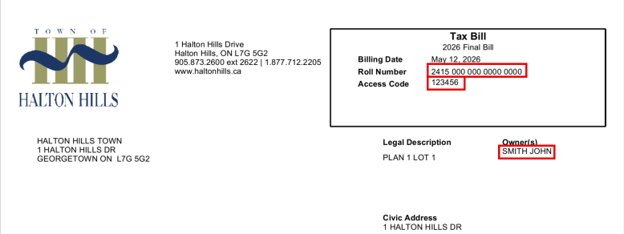
| Roll Number: | 2415 000 000 00000 0000 |
| Access Code: | 123456 |
| Owner Name: | SMITH JOHN
|
Your account will be temporarily locked after too many unsuccessful login attempts. If this happens, an email will be sent to your registered email address with the length of the lockout period.
Once the lockout period has ended, you can:
- Try logging in again, or
- Reset your password.
If you receive a lockout notification and do not recognize the login attempts, reset your password before trying to sign in again.
If you don’t have a copy of your property tax bill, you can request the information needed to register your account.
From the Add Account tab in the Property Tax Portal, select the email request link below the registration fields and submit the required information. The Town will verify your account details and provide the information you need to complete registration.
If you receive an error when logging in or resetting your password, contact the Town for assistance. Include details about the error you are experiencing so staff can help identify the issue.
You can submit an email using the contact link in the footer of any page in the Property Tax Portal. You can also use this link to provide feedback about your experience with the portal.